Tracking & Attribution
Server-Side Tracking Explained: How sGTM and the Conversions API Work

By Dr. Muhammad Abdullah, Pharm.D, MBA · Founder & Chief Systems Architect
Updated · 4 min read

The short answer
Server-side tracking sends conversion events through a server container you control, instead of straight from the visitor's browser to each ad platform. A server-side Google Tag Manager container receives events, removes what should not be shared and forwards the rest to GA4, Google Ads and Meta's Conversions API. The result is more reliable data and more control over personal information.
Key takeaways
- Browser pixels lose data to ad blockers, browser privacy limits and consent choices.
- Server-side GTM is Google's server container. Managed hosts can run it on your own subdomain.
- Meta's Conversions API is its server-to-server endpoint. Pair it with the pixel where appropriate and deduplicate.
- Server-side tracking does not bypass consent. It makes permitted data more reliable and lets you strip personal data.
Most websites send data to five or six advertising platforms straight from the visitor’s browser. Each pixel collects what it likes, ad blockers stop some of them, and nobody is quite sure what leaves the site. Server-side tracking changes that by putting one container you control in the middle.
This guide is for UK marketing leads, practice managers and founders who want reliable conversion data without losing control of personal information. It explains what server-side tracking is, what it can and cannot do, and how a sensible set-up works.
What is server-side tracking?
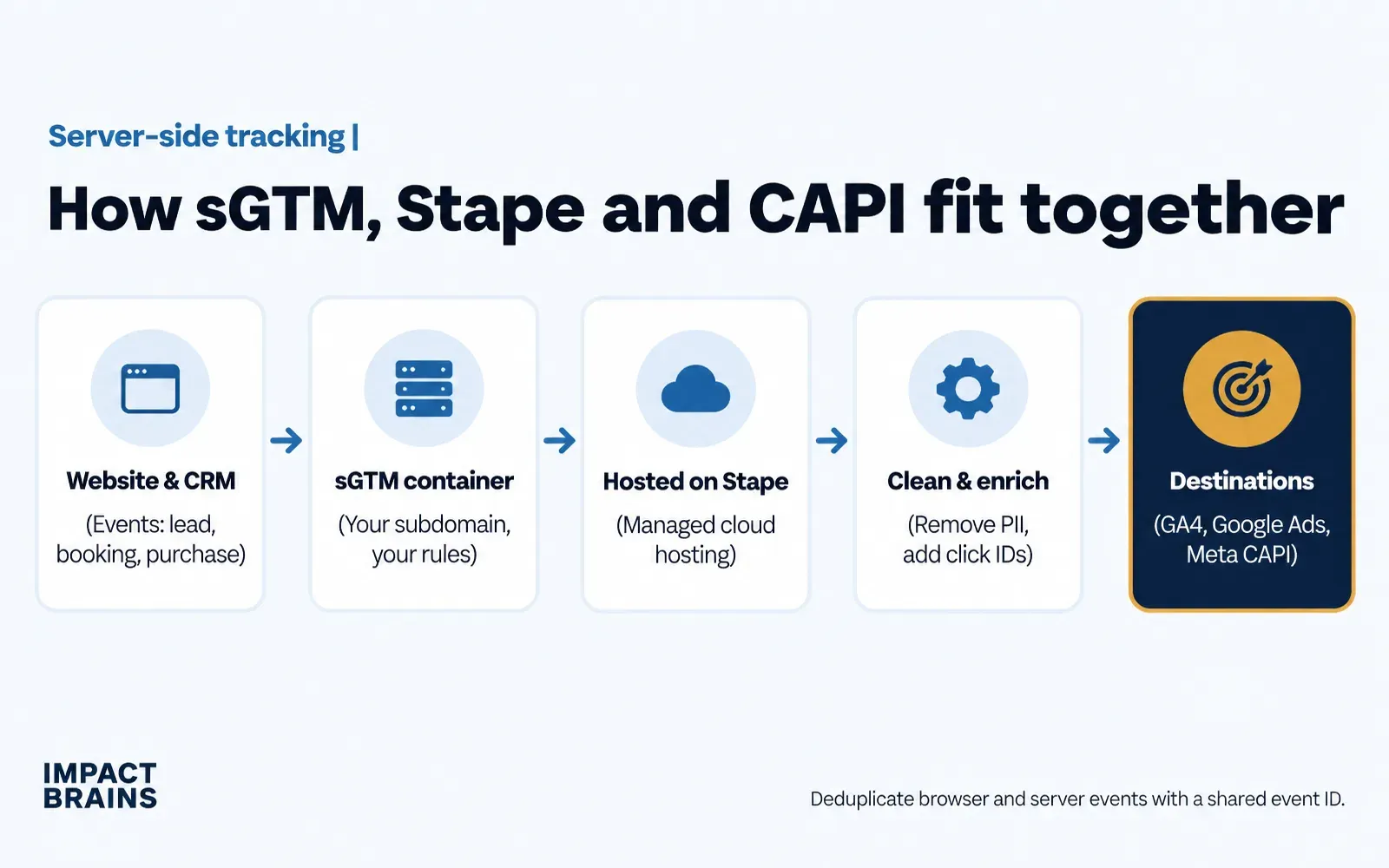
Server-side tracking moves the job of sending conversion data from the visitor’s browser to a server you control. Instead of several pixels each sending data straight from the page, the page, your forms or your CRM send one event to your server container. The container decides what to forward, to which platform and with which fields removed.
Why does browser-only tracking lose data?
- Ad blockers and privacy-focused browsers block common tracking scripts.
- Browsers limit how long some cookies last.
- Consent choices, correctly, stop tags from firing.
- Offline outcomes such as booked appointments or signed contracts never happen in the browser at all.
Server-side tracking cannot override consent, and it should not. What it does is make the data you are allowed to collect more reliable, and let you add outcomes from your CRM.
What are server-side GTM and the Conversions API?
| Component | What it is | Role |
|---|---|---|
| Server-side Google Tag Manager | Google’s server container | Receives events and forwards them to destinations |
| Managed hosting | A provider that runs the container for you | Runs it on your own subdomain without managing cloud servers |
| Meta Conversions API | Meta’s server-to-server endpoint | Receives web and offline events from your server |
| GA4 server tags | Google Analytics server input | Sends events to GA4 from the server |
| Google Ads offline conversions | Import of outcomes by click ID | Teaches bidding which clicks became customers |
Do you still need the pixel with the Conversions API?
Usually yes, on pages where it is appropriate. Meta recommends running the pixel and the Conversions API together and deduplicating with a shared event ID, so each conversion is counted once. On sensitive pages, such as healthcare enquiry forms, use filtered server events only.
Why does it matter for healthcare and regulated businesses?
The server is where you can remove what must never be shared. A server container can strip names, email addresses, phone numbers, IP addresses and free-text fields before forwarding an event, and send ad platforms only a click ID and a non-identifying outcome.
In the UK, health information is special category data under UK GDPR, and cookies and similar technologies fall under PECR, so careful design matters. Clinics serving US patients also need to consider HIPAA, where the US Department of Health and Human Services has published guidance on online tracking technologies. Server-side tracking is not a compliance certificate on its own. It is the foundation that makes a privacy-first set-up possible. See our privacy-first healthcare marketing service for how we approach it.
How much does server-side tracking cost?
There are two parts. Hosting is a monthly cost that scales with request volume, and many providers offer small entry tiers. Set-up is a one-time project to design events, build the container, connect destinations and test. Most of the value, and most of the risk, sits in the set-up.
How do you implement server-side tracking?
- Write a tracking plan. List events, parameters, destinations and which fields must be removed.
- Set up the server container. Create a server-side GTM container and host it on a first-party subdomain.
- Send events to it. From your web container, forms and CRM.
- Add destinations. GA4, Google Ads with enhanced or offline conversions, and the Meta Conversions API with deduplication.
- Redact and test. Remove personal data where required, and test every event in preview mode.
- Respect consent. Make sure consent choices control what the server forwards.
- Monitor. Check event quality and conversion counts weekly.
The hard part is rarely the container. It is agreeing, across marketing and sales, what counts as a conversion.
What to do next
Start by listing every tag on your site and what it sends. If you find pixels on sensitive pages, or conversions counted twice, those are the first fixes. Then decide which outcomes from your CRM should feed back into advertising, and plan a server container around them.
If you would like a second pair of eyes, our free audit maps your current tracking and shows what a server-side tracking set-up would change for your business.
Frequently asked questions
What is server-side tracking?
Server-side tracking sends conversion events from a server container you control rather than directly from the visitor's browser to each platform, so data is more complete and you decide what is shared.
Is server-side tracking worth it?
For businesses spending meaningfully on ads, usually yes. It improves data completeness, adds offline outcomes and gives you control over personal data. Small sites with little ad spend may not need it yet.
Does server-side tracking bypass cookie consent?
No, and it should not. Under UK GDPR and PECR, consent rules still apply. Server-side tracking makes the data you are allowed to collect more reliable.
Is server-side tracking GDPR compliant?
It is a tool, not a certificate. It supports privacy-first set-ups by letting you remove identifiers before data leaves your server, but the design must be documented and reviewed by your data protection lead.

About the author
Dr. Muhammad Abdullah holds a Doctor of Pharmacy and an MBA and founded Impact Brains. Over eight years he has managed more than $7M in ad spend and deployed Google Tag Manager across 50+ accounts in nine countries. He created the IMPACT Marketing System and leads the team that builds it for clients. He is not a medical doctor and does not give clinical advice.
Sources
- Server-side tagging, Google for Developers. Accessed 15 November 2026.
- Conversions API, Meta for Developers. Accessed 15 November 2026.
- About offline conversion imports, Google Ads Help. Accessed 15 November 2026.
- Guidance on the use of storage and access technologies, Information Commissioner's Office. Accessed 15 November 2026.
- Use of online tracking technologies by HIPAA covered entities, U.S. Department of Health and Human Services. Accessed 15 November 2026.
This article is general information only and is not legal, medical, financial or regulatory advice. Rules differ between the UK, US and other markets and change over time. Take advice from a qualified professional before acting on anything specific to your organisation.